Voice recognition has moved from a support function to a competitive requirement. Across customer support, outreach, and service delivery, organisations are finding that voice to text and text to speech capabilities now shape how buyers experience a brand, not just how they contact it. IVR systems, contact centres, media platforms, and beyond are all being rebuilt around this technology.
Voice AI capability underpins conversational voice bots, which can now hold real-time conversations across languages and dialects without losing context or accuracy.
Highlights
Customer satisfaction with AI voice systems averages 3.8 out of 5, nearly double what traditional menu-based IVR systems score.
Companies using voice AI are cutting average handle time by 30 to 40% per case, with labour cost savings estimated as high as $80 billion industry-wide.
Speech recognition accuracy has now surpassed 97% for English and 94% for most major languages, a point at which automation becomes practical even for high-stakes discussions.
For regulated sectors in particular, this figure changes the calculus. A Speech to Text API capable of natural, human-like voice output across languages gives organisations the ability to deliver premium customer experiences without compromising on accuracy or oversight.
What is Voice Recognition Software?
Voice recognition software is a tool that uses automatic speech recognition technology and interprets real-world voices and converts them into a clean, usable text format.
Enterprise workflows can be integrated with speech-to-text capabilities through the following options:
| Option | Best for | How it works |
|---|---|---|
| SDK | Mobile apps, desktop apps, embedded systems | Integrate a library directly into your application. |
| API | Web apps, backend services, enterprise workflows | Send audio to a cloud endpoint and receive a transcript. |
| APK | Android app distribution only | You would integrate STT with an APK only if you are using another app as a standalone tool. |
How to Choose the Right Voice Recognition Software for Your Business?
Picking up the best option for voice AI for your enterprise depends on the infrastructure, workflow complexity and regulatory environments. Here are the top essential features you should evaluate:
Accuracy: Real-world calls are noisy, accents vary, background sound interferes, and every industry has its own vocabulary. The engine needs to hold up in those messy conditions, not just in clean, scripted audio.
Language support: Customers code-switch, like Hindi-English mid-sentence, is the norm in Indian calls, not the exception. The platform should handle mixed-language speech natively, not transcribe each language in isolation.
Speed: For live use cases, voice bots, IVR, and agent assistance, even a 2-3 second lag can break the conversation. Transcription needs to keep pace in real time, not catch up after the fact.
Security & compliance: Call data is often sensitive. Cloud-only APIs won't satisfy every regulator, so you need the option to deploy on your own infrastructure, VPC or on-prem without losing accuracy.
Easy integration: The engine should plug into your existing CRM, contact centre, IVR, and chatbot stack. If integration takes months of custom work, it eats into every other advantage.
Cost & scalability: Call volumes spike with growth and campaigns. Pricing shouldn't scale linearly with volume, the platform should absorb growth without ballooning cost or infrastructure.
Considering these features, you can select the best and most suited voice recognition technology for your enterprise workflow operations.
Top 10 Voice Recognition Software in India
Requirements for voice recognition features vary across industries and use cases. Language requirement, latency, security and accuracy are different requirements among applications like call analysis, real-time support and real-time voice inputs, etc.
Here are the top voice recognition software mentioned below, along with their expertise:
1. Devnagri Speech to Text Software
Devnagri's multilingual Speech to Text platform is an API-first speech recognition built specifically for how India actually talks. It turns spoken audio into accurate text across 60+ Indian and international languages, and it's built to handle code-switching, so when a customer starts a sentence in Hindi and finishes it in English, the transcription doesn't fall apart.
Built for enterprise-scale deployments, it gives contact centres, voice bots, and business workflows fast, secure, production-ready speech recognition.
Language coverage: 60+ Indian and international languages, including Hindi, Tamil, Telugu, Marathi, Kannada, Malayalam, Punjabi, Gujarati, and Bengali, and code-switching isn't an add-on here. It's built in from day one.
Real-time performance: Inference runs 1.5 to 2x faster. On a live customer call or through a voice assistant, that gap between fast and slow is basically the whole experience.
Enterprise deployment: Works cloud- or on-premise, air-gapped too if BFSI or government compliance demands it.
Easy integration: REST APIs and WebSocket support mean it drops into IVRs, CPaaS platforms, CRMs, contact centres, and whatever's already running, without needing a rebuild.
Optimised infrastructure: The model itself is small, just 4.7 GB, so infrastructure costs stay down and it still runs fine on resource-constrained setups without losing production-grade performance.
Secure by design: Data stays inside your infrastructure. Built API-first around data sovereignty, so compliance isn't something bolted on after the fact.
Best suited for: Banks, NBFCs, insurance providers, government agencies, contact centres, ecommerce organisations, and any enterprise building voice AI, customer support automation, IVR systems, conversational AI, or speech analytics across Indian languages.
Build language-rich voice experiences with Devnagri Speech to Text, accurate, rapid, and ready for enterprise use across India's language landscape.
2. Trint
Trint started as a tool for journalists, and it still shows in how it's built. You feed it audio or video, and it gives you back a transcript you can actually search. Speaker tags, timestamps, comments. The things that matter when three people on a team are working off the same interview recording at once, instead of one person owning the file.
Speaker ID: Happens automatically. No more sitting there labelling who said what in a 45-minute recording.
Collaborative editing: Comments and changes are all visible to the team in real time.
Searchable timestamps: Baked into the transcript itself. You can jump straight to a quote instead of scrubbing through audio trying to find it again.
Language support: Covers several languages, which matters if your newsroom isn't working in just one.
Flexible export: Outputs to Word, PDF, SRT, or whatever the next step needs.
Best suited for: Newsrooms, broadcasters, researchers, documentary teams, and media organisations that need collaborative transcription and content production.
3. Apple Siri
Siri runs on speech recognition plus Apple Intelligence, and the whole point is that it follows you across devices. Start a request on your phone, it picks up context on your watch or your Mac. Most of it happens on-device too, so you don't have to send everything off to a server just to get a reminder set.
Ecosystem integration: Works across iPhone, iPad, Mac, and Watch. Context carries between them.
Live dictation: For messages, notes, or whatever you're typing by voice instead.
On-device processing: Stays local most of the time. Keeps things private without adding lag.
Natural language understanding: No need to memorise exact commands.
Third-party app support: Extends beyond Apple's own apps.
Best suited for: Apple users and developers building voice-enabled experiences within the iOS, iPadOS, and macOS ecosystem.
4. Google Cloud Speech-to-Text
Teams tend to land here once audio volume gets big enough that smaller tools start choking. It uses Google's own models, supports both real-time and batch processing, and provides REST or gRPC access so engineers can integrate it into their existing pipelines rather than being limited to someone else's interface.
Dual transcription modes: Handles both live and batch transcription.
Developer APIs: REST and gRPC access built for teams who want to build around it.
Automatic formatting: Punctuation and speaker recognition get added without manual cleanup.
Cloud-scale infrastructure: High call counts don't slow it down.
Broad format support: Covers a wide range of languages and audio formats.
Best suited for: Enterprises, developers, contact centres, and organisations processing high volumes of audio across cloud applications.
5. ReadSpeaker
The whole idea behind ReadSpeaker is accessibility. Text becomes speech, and it sounds like a person, not a robot reading off a script. It sits inside websites, learning platforms, and whatever enterprise system needs it, so accessibility compliance stops being a separate project bolted on at the end.
Natural voice output: Not flat, not robotic.
Platform integration: Embeds directly into websites and learning platforms.
Compliance support: Helps meet accessibility regulations without extra engineering work.
Voice variety: Multiple languages and voice options available.
Cloud deployment: Nothing heavy required on your end.
Best suited for: Educational institutions, government organisations, publishers, and enterprises focused on digital accessibility.
6. OpenText CX-E Voice
This one folds voice automation straight into contact centre and business communication systems a company is already running. Not a bolt-on. It sits inside the workflow, which is really what lets teams modernise without tearing out infrastructure that already works.
Voice automation: Automates routine voice interactions.
Contact centre integration: Plugs into existing contact centre software.
Unified communication: Brings voice, messaging, and customer data together in one place.
Workflow automation: Cuts down manual work on repetitive communication tasks.
Secure deployment: Built with enterprise-grade security in mind.
Best suited for: Large enterprises, customer service organisations, and businesses modernising contact centre operations.
7. Dragon
Dragon's reputation comes from fields where accuracy is critical. Doctors dictate notes, lawyers draft filings, and it adapts to specialised vocabulary that would trip up a general tool. People also use it to control entire applications by voice, not just to write.
High accuracy: Reliable even with dense, technical language.
Document dictation: Full documents and emails can be dictated hands-free.
Custom vocabulary: Learns industry-specific and user-specific terms over time.
Voice application control: Extends beyond dictation to controlling entire applications.
Workflow fit: Designed around how clinical, legal, and enterprise teams actually work.
Best suited for: Healthcare professionals, legal firms, enterprises, and individuals who rely heavily on voice dictation.
8. Deepgram
Deepgram is built for developers first, with speed above almost everything else. It's what sits under voice bots, contact centres, and conversational AI, anywhere a one- or two-second delay means the person on the call notices something's off.
Transcription modes: Covers both real-time and batch transcription.
Streaming APIs: Built for low latency.
Speaker diarisation: Automatically distinguishes speakers in a single audio stream.
Language detection: Identifies the spoken language without manual setup.
Speech analytics: Surfaces insights from conversations, not just plain transcripts.
Best suited for: Developers, conversational AI platforms, contact centres, and enterprises building voice-enabled applications.
9. LumenVox
Telecom companies and banks have used LumenVox for years now, mostly for IVR and voice biometrics. It slots into infrastructure that's already there. Nobody's ripping out their phone systems to install it.
IVR recognition: Automates spoken menu navigation and call routing.
Voice biometrics: Verifies caller identity through voice.
Telephony integration: Built specifically for existing telecom infrastructure.
Language support: Recognition works across several languages.
Flexible deployment: Available on-premise or cloud, depending on what compliance calls for.
Best suited for: Telecom providers, financial institutions, government agencies, and enterprise contact centres.
10. Keen Research
Not every device has a reliable connection, and that's the gap Keen Research fills. Recognition happens entirely on the device. No round trip to a server means voice control keeps working offline, and the response time is close to instant.
On-device recognition: Processes speech locally, no network needed.
Offline functionality: Keeps working in low or no connectivity environments.
Privacy-first design: Voice data stays on-device instead of routing externally.
Low latency: Near-instant response, since there's nothing to send out and wait on.
Lightweight SDK: Built for embedded or resource-limited systems.
Best suited for: IoT manufacturers, automotive companies, embedded systems developers, and consumer electronics brands.
How Voice Recognition Powers Conversational AI Voice Bots?
Voice AI is what makes a conversational AI voice bot actually work. It's the engine running underneath everything the bot does. When a bot handles multiple languages well, that's not a separate skill bolted on, it comes directly from the voice AI itself.
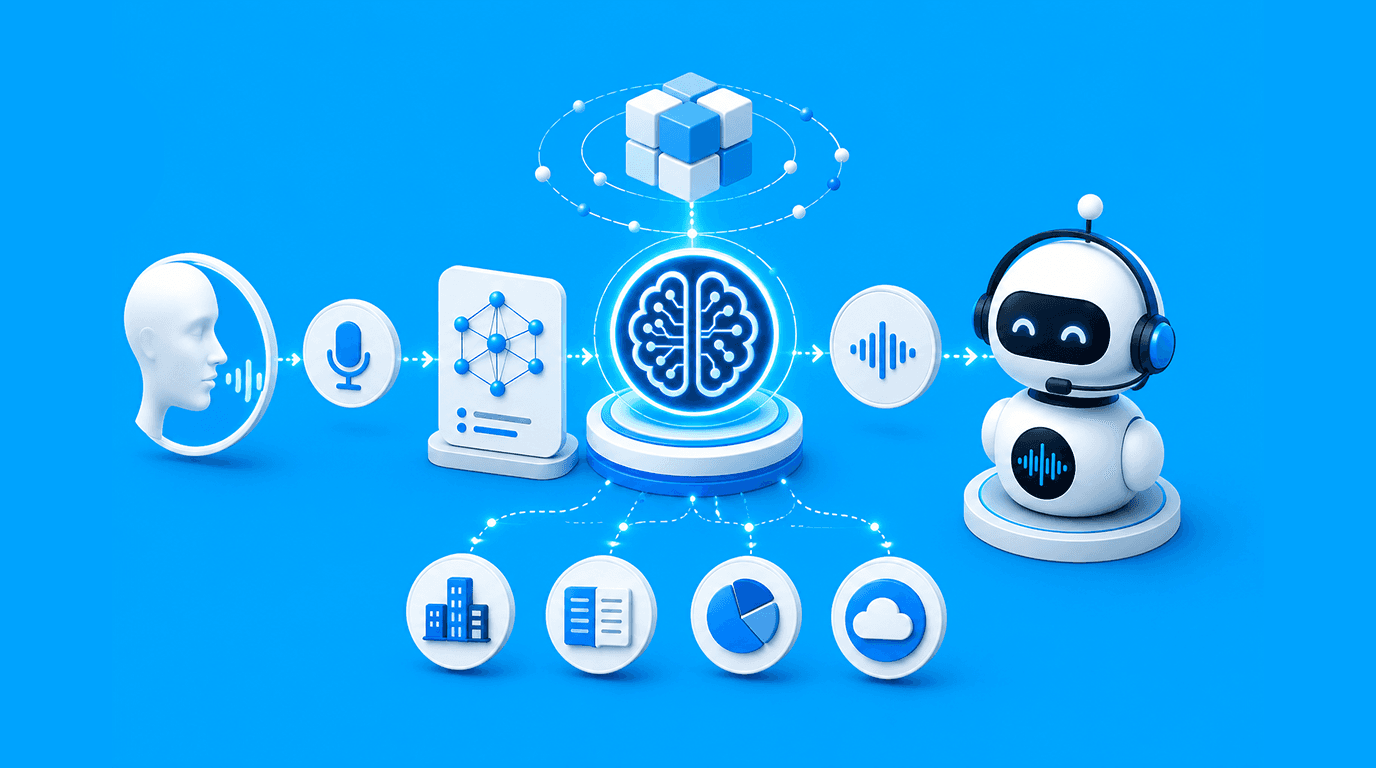
When a customer speaks, a speech to text API converts that audio into text almost instantly. That text gets checked against a knowledge base to figure out what the person actually needs. Then the response gets converted back into speech and sent out. Three steps, and all of it needs to happen within milliseconds, because the moment a customer notices a delay, the conversation stops feeling natural.
The consumer initiates the conversation. It all starts with a simple vocal interaction, be it a phone call, voice bot, mobile app or IVR.
Speech to text: The system converts the conversation to accurate text in real time as the customer talks.
AI understands the request: The transcript is parsed to detect the purpose of the customer, extract crucial details and grasp what the customer is asking.
The proper workflow is being fired. Based on that knowledge the system automatically forwards the request, starts the next procedure, sends it for approval or escalates it when needed.
The consumer hears a natural, human-voice response from the algorithm, allowing the conversation to continue effortlessly.
All interactions are automatically recorded and shared with CRM tools, ticketing systems, analytics programs and reports, guaranteeing there is never any human data entry, and that records are constantly up to date.
Key Takeaways
Choosing the right voice recognition software majorly focuses on the alignment with business operations and expected outcomes. Counting on the features does not really imply the right tool selection.
Devnagri specialises in the Text to Speech API for over 60 Indian and international languages. Voice recognition software supports code-mixed language across different dialects from the real environment. It empowers enterprises to run their operations with zero data retention and security.
Discover how these capabilities help teams implement context-aware, scalable, voice-search- and voice-driven workflows that align with enterprise security and compliance needs.